Kepta: Kitchen Inventory
Waste Less, Save Money
Kepta keeps track of the food in your fridge, freezer, and pantry, warns you before it goes bad, helps you cook what you already have, and shows what your waste really costs, charged only for the part you actually throw away. It's free, your whole family can share one kitchen, and there are no ads, no tracking, and no item limits.

Kepta is free. Everything that saves food is free, with no item limits: the inventory, reminders, recipes, the shopping list, and family sharing. Kepta Plus is an optional upgrade for deeper money reports: $2.99 a month, $19.99 a year with a free first week for new subscribers, or $39.99 once. Everything free today stays free.
How it works
Four habits, each a few seconds long. That's the whole system.
Add in seconds
Tap a chip for staples like milk or eggs, or type a couple of letters and pick from the suggestions. Kepta guesses the category, the spot, and the shelf life for you. There's no barcode scanner yet. For now, a tap or two covers most items.
Colors tell you what to use
Every item gets a color from how much of its shelf life is left, based on typical storage times for its kind of food and where you keep it. Raw meat and seafood in the fridge count down to cook instead, and fridge leftovers count down to eat, so you know what to use first.
- Fresh
- Soon
- Past
Cook what you have
100 recipes, ranked by what's actually in your kitchen. Dishes you can make right now come first, and anything that rescues expiring food gets a boost. Every recipe has a Watch on YouTube button that finds cooking videos for that dish, and you can save your own.
See honest money
When food gets used, you saved what it cost. When it gets tossed, you wasted it. Kepta adds up the prices you enter, and if you skip one it uses a plain typical price you can change. No AI ever guesses a price.
A look inside
Three screens do most of the work.

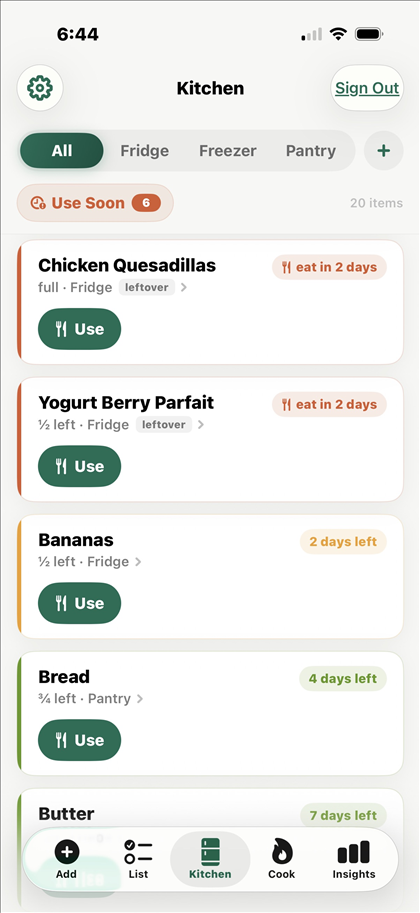

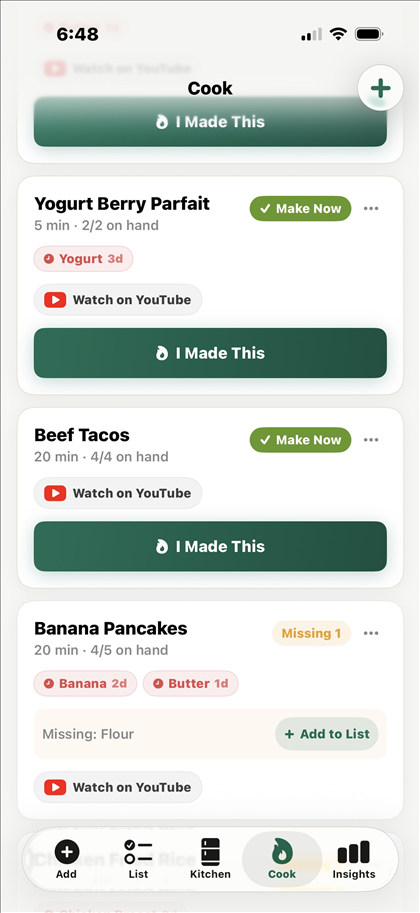

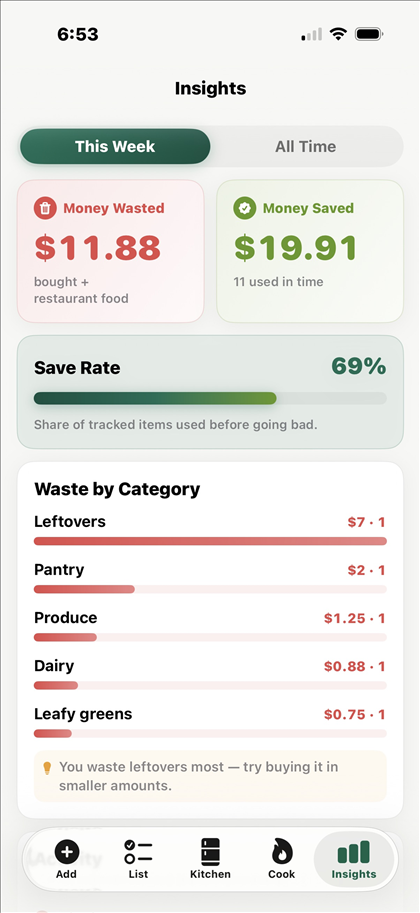
One kitchen for the whole family, free
Your kitchen has a six-character invite code. Share it, and family members join your kitchen from their own phones. Everyone sees the same shelves, the same list, the same leftovers. When someone finishes the milk, it's gone from everyone's kitchen the next time they check.
ABC-123Also included, also free
- ●Daily reminders that name real items ("use the chicken"), not generic nags
- ●Shopping list grouped by aisle, flowing straight into your kitchen with prices
- ●Custom places: name your own fridges, freezers, and cupboards
- ●Works offline: browse your kitchen and queue new adds; everything syncs when you're back
- ●An Undo button right after you add, use, or toss food, so a mis-tap costs nothing
- ●No item limits, no ads, no tracking. Your email and kitchen data are used only to run Kepta, and Kepta Plus purchases are handled by Apple and RevenueCat
- ●Delete your account in the app, any time
Switching from another app?
Kepta has no item limits, and family sharing is free. If you're weighing it against another app, these pages lay out the differences plainly, including where Kepta is behind: Kepta vs Eatvora · Moving from CozZo.
Kepta has
- No item limits
- Free family sharing
- Waste counted at your own prices
Not yet
- Barcode scanning
- Receipt scanning
The honest-money principle
Savings numbers are easy to inflate. Three rules keep the math believable:
Type the price once and that's what counts. Skip it, and Kepta uses a plain typical price for that kind of food, which you can change any time. No AI ever guesses a price.
Homemade meals are counted as dishes cooked, never converted into fake dollar "savings." A home-cooked dinner is a win; it isn't $14.37.
Partial use charges proportionally. Use half of a $10 roast, and $5 moves to saved. Toss the other half, and $5 moves to wasted. The math always adds up.
$5.00 saved
$5.00 wasted
Quick questions
Is Kepta free?
Yes. The core app is free: the inventory, family sharing, recipes, reminders, and the money numbers, with no item limits and no ads. Kepta Plus is an optional upgrade with This Month and This Year views, your most-tossed foods, tips, and a six-month chart, at $2.99 a month, $19.99 a year with a free first week for new subscribers, or $39.99 once. Everything free today stays free.
What phones does it run on?
iPhone. Kepta is an iOS app. Android is on the long-term list, but we won't promise a date we can't keep.
How does the family kitchen work?
Your kitchen has a six-character invite code, like ABC-123. Family members type it in on their own phones and everyone shares the same kitchen: same shelves, same list, same leftovers. Sharing is free.
Do you sell my data?
No. Your email and kitchen data are used only to run Kepta, and Kepta Plus purchases are handled by Apple and RevenueCat, as the Privacy Policy explains. No ads, no tracking, and you can delete your account and everything in it from inside the app at any time.
Where do I get it?
Kepta is on the App Store now, free. Download it here.
Why "Kepta"?
From kept: a well kept kitchen, money you keep, recipes worth keeping. It's also the Lithuanian word for baked, which felt right for an app that would rather see your food cooked than tossed.
Put your kitchen in Kepta
Free on the App Store, with family sharing included.